Data Cleaning and Preprocessing
This stage prepares raw hyperspectral, RGB, and depth images for segmentation, feature extraction, modeling, and visualization.
Preprocessing Goal
The goal of preprocessing was to turn raw image folders into clean, structured, and usable data. This included validating hyperspectral cubes, removing unusable frames, keeping images from the proper lighting window, separating control and drought plants, and preparing plant masks for feature extraction.
Raw Data
Load RGB, depth, and hyperspectral images from experiment folders.
Validation
Check image quality, timestamps, lighting, and valid band structure.
Filtering
Remove dim, corrupted, invalid, or unusable frames.
Segmentation
Create plant masks and separate control and drought plants.
Clean Output
Save cleaned metadata and feature ready data for later analysis.
Hyperspectral Preprocessing
The hyperspectral preprocessing work cleaned raw TIFF image cubes before vegetation index extraction. The main purpose was to make sure only valid and usable hyperspectral images moved forward in the pipeline.
Filename Parsing
Messy filenames were parsed to extract date and sequence information so the images could be sorted and tracked.
Band Validation
Each hyperspectral image was checked for the expected 51 band cube structure before being included in the cleaned dataset.
NDVI Computation
NDVI was computed from selected spectral bands to help identify plant pixels and separate vegetation from the background.
Vegetation Masking
NDVI thresholding was used to create plant masks, followed by cleanup steps to remove small noisy regions.
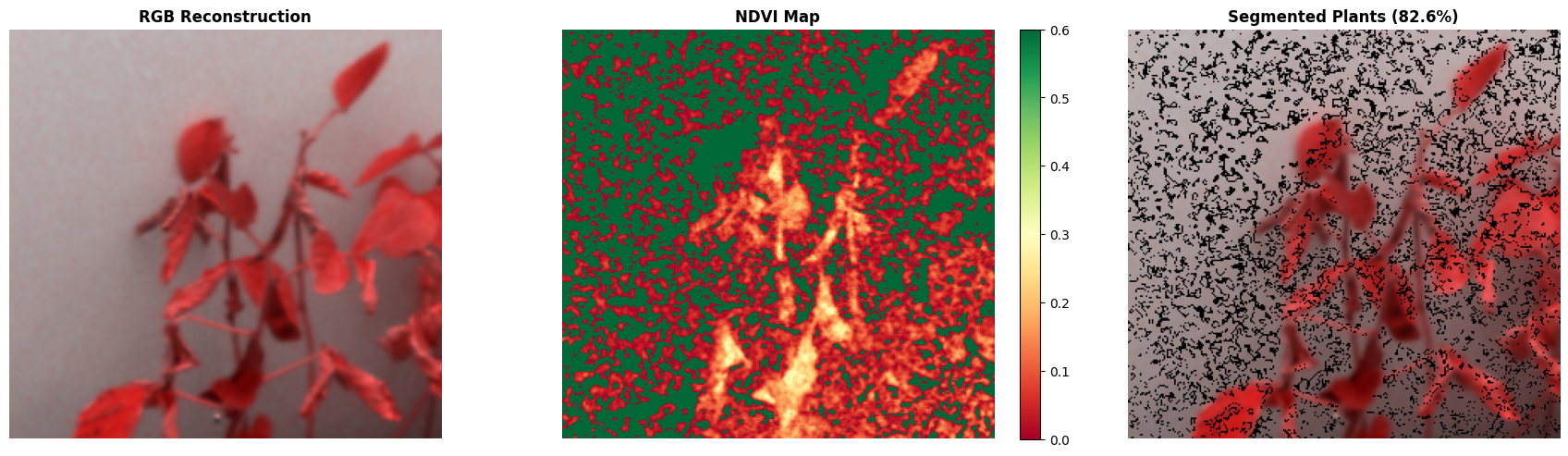
Hyperspectral NDVI Masking Example
This visual shows how hyperspectral data was transformed into NDVI based plant masks, helping separate vegetation pixels from the image background before feature extraction.
Key outputs included cleaned dataset indexes, verified 51 band images, NDVI based vegetation masks, mask ratio, mean NDVI, median NDVI, and metadata CSV files.
Hyperspectral Quality Filtering
For the Set 1 hyperspectral feature workflow, extra quality checks were used before calculating vegetation indices. This helped reduce noisy or unreliable records.
- Images were filtered to the lights on window.
- Only valid 51 band TIFF cubes were used.
- Low quality frames were filtered using signal to noise ratio, coverage, and NDVI checks.
- Plant pixels were segmented using NDVI based thresholding.
- The cleaned HS feature workflow produced timestamped vegetation index records.
RealSense RGB and Depth Preprocessing
The RealSense preprocessing workflow prepared RGB images and 16 bit raw depth images for plant segmentation and feature extraction. The final RealSense pipeline used the raw depth file for depth based traits and did not use the 8 bit depth visualization for feature extraction.
Lights On Filtering
Frames were filtered to the grow light window so the images had more consistent lighting conditions.
Brightness Check
Dim or corrupted RGB frames were rejected when the mean RGB brightness was too low.
Raw Depth Selection
The 16 bit raw depth image was used for feature extraction because it keeps the actual depth information.
Frame Filtering
Unusable frames were removed before segmentation, feature extraction, and modeling.
Plant Segmentation
The RealSense pipeline used Grounded SAM 2 for zero shot segmentation with the prompt “soybean plant.” This allowed plant level segmentation without training a custom segmentation model.
Grounded SAM 2
The model detected soybean plants from the RGB image using a text prompt.
SAM 2.1 Masks
SAM 2.1 generated plant masks from the detected plant regions.
Control vs Drought
The left plant was treated as control and the right plant was treated as drought based on the detection box center.
HSV Refinement
HSV color filtering was used as a backup refinement step to remove pot regions and clean plant edges.
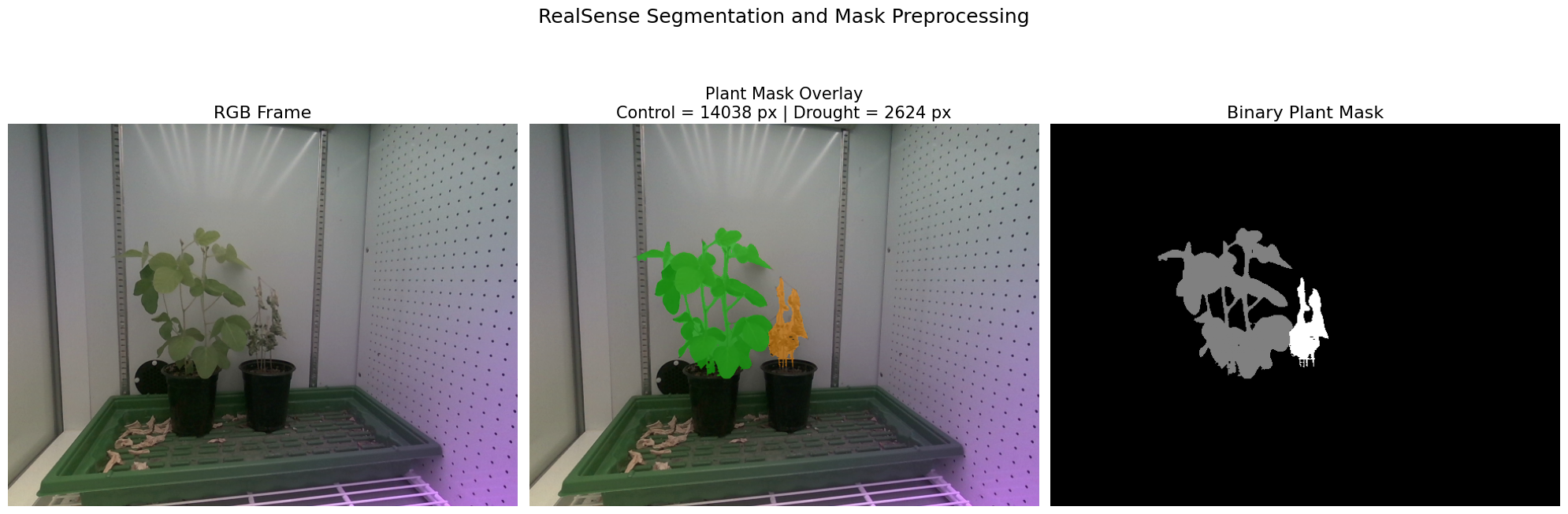
RealSense Segmentation Output
This visual shows the RGB frame, plant mask overlay, and segmentation mask used to separate the control and drought soybean plants before extracting features.
The final RealSense preprocessing and segmentation workflow kept 265 usable per plant frames after filtering.
Preprocessing Outputs
- Cleaned hyperspectral image indexes and metadata files.
- Verified HS images with valid 51 band structure.
- NDVI based plant masks for hyperspectral data.
- Filtered RealSense RGB and 16 bit raw depth frames.
- Plant masks from Grounded SAM 2 and SAM 2.1.
- Separated control and drought plant regions.
- Feature ready data for RGB, depth, and hyperspectral analysis.
Why Preprocessing Matters
Preprocessing is one of the most important steps in the project because the final features and model results depend on clean images and reliable plant masks. Removing bad frames, validating hyperspectral cubes, and separating the plants correctly helped make the rest of the pipeline more consistent.
← Back to Home